


Cat Coffee Shop

Tomodachi Life: Living the Dream

Joy Pony

Game of Farmers
Life The Game

Good Coffee, Great Coffee

Cinema Simulator











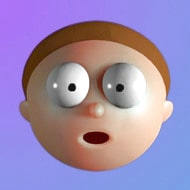




You open Elastic Face with a full-length workday still sitting in your shoulders, and the game asks nothing of you except to grab the nose and pull. There’s no score, no level counter, no fail state — just a face rendered in soft, rubbery physics waiting for you to stretch it somewhere it was never meant to go.
| Genre | Physics toy / stress relief |
| Platform | Browser |
| Core mechanic | Click and drag facial features to stretch and distort them, release to snap back |
| Objective | None — free-form manipulation |
The entire interaction in Elastic Face comes down to three inputs: click, drag, release. Left-click grabs whatever part of the face sits under your cursor — an eye, the nose, a cheek, the mouth — and dragging stretches that region while the rest of the mesh resists and wobbles in response. Letting go snaps the pulled section back toward its resting shape, though not instantly; there’s a small delay where the skin jiggles and overshoots before settling, which is honestly most of the appeal. Grab the mouth and pull it sideways instead of down, and the resistance you feel is different too — the mesh doesn’t stretch uniformly in every direction, so horizontal pulls on the mouth produce a different wobble pattern than a straight downward tug on the same feature.
New players tend to grab and immediately release, treating it like a single tap. That undersells the game. Holding the drag longer and moving the cursor in a curved rather than straight line produces far more exaggerated, more satisfying distortions, since the elastic response builds with sustained pull rather than a quick flick. Players who stick with Elastic Face past that first minute usually discover this on their own — once you notice the skin actually resists more the longer you hold a stretch, dragging in slow arcs instead of quick straight lines becomes second nature.
Right-click serves as a full reset, snapping the face back to its default shape instantly if you’ve stretched things into a state you can’t undo through normal release alone. Players experimenting with extreme distortions lean on Right-Click constantly, since some combinations of stretched features are easier to reset than to manually pull back into place. This is where the “screenshot collectors” among the player base tend to work — they’ll build toward one absurd expression, snap an image of it before it snaps back, then hit Right-Click and start over rather than trying to manually undo a face that’s been stretched into something unrecognizable. Casual stress-relief browsers, by contrast, rarely touch Right-Click at all; they let each distortion wobble back on its own, since the slow, jiggly return is the part they’re actually here for.
Scrolling the mouse wheel zooms in and out on the face, and it’s not just cosmetic — zooming in changes how precisely you can target small features like the corner of an eye versus grabbing a broad section of cheek. Players chasing very specific distortions tend to zoom in tight before dragging, while players just messing around zoom out and grab in broad strokes. Once you’re zoomed in past the point where the whole face fits on screen, dragging becomes noticeably more surgical — you can isolate just the eyebrow or just the lower lip instead of accidentally catching a wider chunk of the mesh in your click.
The Medium and High quality toggle affects how detailed the stretch physics look, with High quality showing finer skin deformation and more visible wobble on release. It’s a small setting, but it noticeably changes how satisfying the elastic snap-back feels, especially on a face pulled into an extreme shape. Players on slower devices sometimes drop to Medium not for the visuals but for smoother dragging — the physics calculation that drives the wobble can lag slightly at High quality if the hardware isn’t keeping up, and a stuttery drag ruins the exact sensation the setting is supposed to enhance.
Community discussion around Elastic Face treats the quality toggle as one of the more overlooked settings in the game, since most players never open the options menu at all and just play on whatever the default happens to be. The ones who do tinker with it — call them the “quality tinkerers” — are usually the same players chasing screenshot-worthy distortions, since High quality is where the fine ripples and skin creases actually show up clearly enough to be worth capturing.
There’s a specific reason Elastic Face gets recommended as a quick break rather than a real game — the lack of objective is the feature, not a gap. You can’t fail, there’s no timer, and the only feedback loop is visual and immediate. That’s a deliberate departure from most browser games, and it’s part of why sessions tend to run under five minutes instead of the usual “one more round” trap other clickers create. Once the novelty of a single stretched feature wears off — usually somewhere around the point you’ve tried pulling every part of the face at least once — most players either reset and start a fresh round of distortions or simply close the tab, and both endings feel equally natural for a game with no completion state to chase.
The honest criticism players raise is that it wears thin fast for anyone expecting actual gameplay. Elastic Face isn’t building toward anything, and once you’ve explored the full range of stretch and snap on a given face, there’s genuinely nothing left to unlock. It’s a toy, not a game with progression, and it works best treated that way. Players who arrive expecting objectives, characters, or any kind of narrative — expectations set by browser games in general — tend to bounce off within a minute or two, while players who come in already knowing it’s a stress toy get exactly what they were looking for.
That divide shows up constantly in how the game gets described online: some corners of the community call it one of the better “digital fidget” tools precisely because it has no goal, while others dismiss it outright as barely a game at all. Both reactions are really describing the same design choice from opposite angles, and neither is wrong — Elastic Face was never trying to be anything other than a face you can pull apart and watch spring back.
No — there’s no score, no win condition, and no level structure. The face can be stretched and reset indefinitely using Left-Click to distort it and Right-Click to snap it back, with the interaction itself being the entire point rather than a means to some larger objective.
Right-click resets the face to its original shape immediately, which is useful after an extreme stretch that would take a long time to manually pull back into place through normal drag-and-release — especially once you’ve distorted several features at once and the mesh no longer resembles anything close to a face.
Elastic Face doesn’t try to be more than what the click-drag-release loop already delivers — grab the nose, crank the quality setting to High, zoom in on the corner of an eye, and let the elastic snap-back do the rest of the work.